What’s covered
- Where does the Figma-integrated localization workflow fail?
- What does a Figma-integrated game localization workflow look like?
- How do you prepare Figma for game localization?
- How does the localization platform connect Figma to the game engine?
- FAQ
- Closing
- Key takeaways
Most problems with a game localization workflow don’t start in the translation tool. They start in the handoff.
A designer finishes a UI screen in Figma. The text is in English, sitting in a dozen separate layers across three frames. A localization manager exports a screenshot and pastes the strings into a spreadsheet. A translator works from that spreadsheet with no idea what the strings look like in context. An engineer manually imports a file into Unity. Someone updates the English copy. The whole cycle repeats.
At low volume, this is annoying. At scale — ten languages, weekly content updates, a live service game with seasonal events — it breaks.
The studios that solve this problem aren’t doing anything exotic. They’re connecting the tools they already use — Figma, a localization platform, and their game engine — into a single, traceable pipeline where strings move automatically and nothing falls through the gap between design and ship.
This post covers how a Figma-integrated game localization workflow operates in practice, what it takes to set one up, and what two mobile game studios learned building it.
Where does the Figma-integrated localization workflow fail?
Localization with Figma often fails because Figma, translation tools, and game engines were each built to solve different problems — and without a connecting layer, strings have to be moved manually between all three.
- Strings live in layers, not systems. Text in Figma is a design element. It has no unique ID, no connection to a translation workflow, and no awareness of the game engine. Moving it anywhere requires a human to copy, export, or re-enter it — and without an integrated solution, teams end up manually copy-pasting strings and exchanging files, which is slow and introduces errors at every handoff.
- Translators work without context. When strings are extracted from Figma and handed to translators in a spreadsheet or CAT tool, the visual context disappears. In practice, localization teams often receive Jira tasks with static screenshots rather than direct access to Figma layouts — making it impossible to see how translations will actually fit on screen. Translators don't know which screen the string belongs to, how much space it has, or what comes before and after it.
- Design breakage and text overflow. Because screen space — especially on mobile — is limited, localization frequently leads to broken layouts and overflowing text when translations take up significantly more space than the original. German alone can run 30% longer than English. A UI designed only for English will break in some combination of its target languages, and without live layout previews during the translation process, these breaks aren't caught until much later.
- Updates multiply the problem. A game that shipped in five languages six months ago now needs to add two more, patch a string that changed in English, and ship a new seasonal event by Friday. Each of those is a separate manual operation if the pipeline isn't connected. None of them is trackable if strings don't have IDs.
- Engineers carry the localization load. Without automation, getting translations into the engine falls to developers. They import files, manage formats, and fix encoding issues — work that has nothing to do with building the game.
- Localization bugs surface too late. In traditional workflows, UI localization issues — text overflow, broken layouts, missing strings — are often not discovered until late in development, well past the point where they're cheap to fix. By then, the design phase is over and fixes require engineering time rather than a simple layout adjustment.
The solution isn’t a different tool for any one of these steps. It’s a pipeline that connects all of them.
What does a Figma-integrated game localization workflow look like?
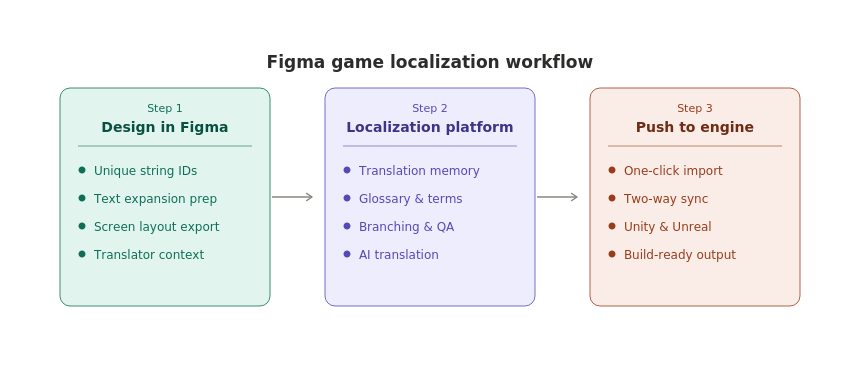
A Figma-to-engine game localization workflow has three steps: design preparation in Figma, string management and translation in a localization platform, and direct integration with the game engine. Each step feeds into the next without manual file handling.
Here’s the overview before we go through each step in detail:
| Step | What happens | Team involved |
|---|---|---|
| 1. Design in Figma | Strings are keyed and UI is prepared for text expansion. | Designers and localization managers. |
| 2. Manage in a localization platform | Strings are translated, reviewed, and QA'd with visual context. | Localization managers, translators, QA. |
| 3. Push to the game engine | Translations are pushed to Unity or Unreal via direct integration. | Developers. |
How do you prepare Figma for game localization?
Preparing Figma for localization means structuring text layers so they can be extracted cleanly, keyed with unique string IDs, and handed to translators with visual context — before any translation work begins. Localization retrofitted onto a finished design costs significantly more than localization built in from the start — in some cases, post-integration UI fixes cost more than the original translation itself (Pangea Global, 2026).
A few conventions that make a significant difference:
- Allow 30% extra space in UI elements. Languages like German and Spanish can run up to 30% longer than English, breaking fixed-width buttons, labels, and dialogue boxes (Translated, 2025). Design containers that can flex, not clip.
- Use game code to display text in images. Text baked into asset files has to be localized separately for every language. Rendering from strings is far more efficient.
- Assign unique string IDs to every text element. Without IDs, there's no reliable way to track updates or confirm the right translation is in the right place. The IGDA Localization SIG Best Practices guide recommends unique identifiers for every string in externalized resource files (IGDA, 2021).
- Avoid combined strings. Strings assembled from two or more text fragments in code are extremely difficult to localize correctly — word order, gender, and grammar differ across languages.
- Store language-specific assets in one directory. Images with text, audio files, and localized icons should be findable without hunting through the project structure.
- Add Unicode and bidirectional text support early. Unicode covers CJK and non-Latin character sets. Bidirectional support for Arabic and Hebrew is significantly harder to retrofit than to plan for.
How does the localization platform connect Figma to the game engine?
A localization platform sits between Figma and the game engine, handling the handoff in both directions — screen layouts flow in from Figma to give translators visual context, and completed translations flow out to the engine via direct integration, with no manual file handling at either end.
This is the layer that makes the pipeline work. Without it, context is lost between tools, versions diverge, and QA carries problems that should have been caught at the design stage.
How does the Figma integration work?
Localization specialists export screen layouts from Figma directly into the platform, giving translators a visual reference for every string — exactly what’s on screen, what fits within the boundary, and what surrounds the text. String changes made in the platform can also be reflected back into Figma, keeping design and localization in sync throughout the project.
For CM Games, this was one of the most valuable parts of the pipeline they built for the Nitro Nation World Tour. The Figma integration allowed localization specialists to collaborate directly with UX designers, review the most recent screen layouts, and ensure that text — and its translations — fit within the designated boundaries, without translators needing access to the design file itself.
What does the platform provide that Figma can’t?
The core difference is that a localization platform manages the full lifecycle of a string, not just its content:
- Translation memory and glossary. Previously translated strings surface automatically, and game-specific terms are protected centrally — keeping terminology consistent and avoiding duplicate translation costs.
- Branching. A draft branch holds work in progress; a master branch holds only QA-verified strings. Localization managers merge strings once reviewed — the same version control logic developers use for code.
- Customizable views and status tracking. Each team member sees only what's relevant to their role. A status field on every string gives the whole team a real-time view of where content sits in the pipeline.
- Character limit monitoring. A dedicated view tracks character counts against UI limits per language, catching overflow before it reaches the build.
- Screenshots from builds. QA specialists can push screenshots directly from the game into the platform, with the relevant string highlighted in context.
How does the engine integration work?
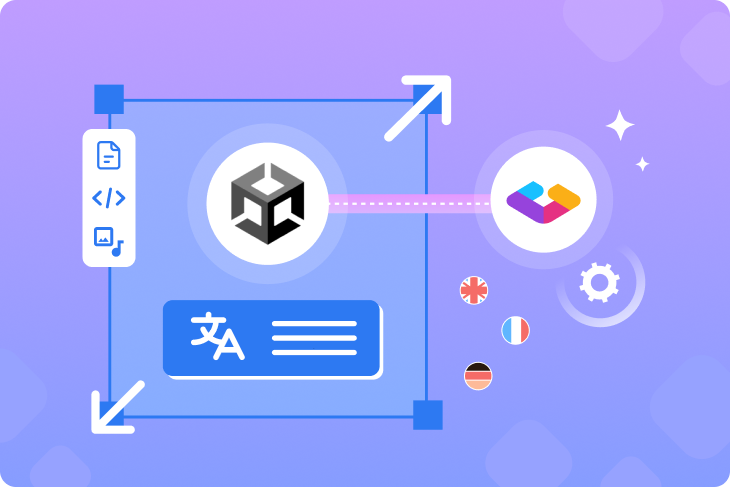
A direct API connection between the platform and Unity or Unreal replaces manual file exports with a two-way sync. Source strings can be pushed to the platform for translation, and completed translations pulled back into the build with a single click — removing developers from the localization critical path entirely.
CM Games replaced a multi-step Google Sheets-to-Unity process with this approach, cutting localization file processing time by 90% and reducing errors by 75%. Gridly’s Unity plugin is open source and extendable — Belka Games built a custom version that also handled screenshot capture from builds directly into Gridly. For Unreal Engine studios, the same principle applies via a direct API integration.
Here is the full Figma-integrated localization workflow implemented by CM Games.
FAQ
How to integrate Figma into your game localization workflow?
A Figma-to-engine localization workflow is a pipeline that moves strings from design files in Figma through a localization platform for translation and review, then pushes completed translations directly to Unity or Unreal — without manual file exports or imports at any stage. The pipeline gives designers, localization managers, translators, QA specialists, and engineers a shared, traceable workflow for multilingual content.
Do you need a localization platform to localize a game from Figma?
Not at low volume. Studios localizing a small game into one or two languages can manage with spreadsheets and manual exports. The localization platform becomes necessary when the combination of languages, update frequency, and team size makes manual management unreliable. Version conflicts, inconsistent terminology, and QA issues caught late are the typical signs that a pipeline is needed.
How does the Gridly Figma integration work?
The Gridly Figma integration allows localization specialists to export screen layouts from Figma directly into Gridly. Translators can then see the exact screen layout as a visual reference alongside the strings they’re translating, without needing access to the Figma file. Changes to source text in Figma are flagged automatically in Gridly for review.
How long does it take to integrate Figma into your localization workflow?
Setup time depends on the complexity of the project and how much content needs to be migrated. Belka Games found that each successive project migration was faster than the previous one, as the team refined their checklist and understood which steps were critical at the start versus which could be deferred. The most time-intensive parts of the initial setup are typically infrastructure preparation (project structure, databases, views), glossary creation, and developer integration work.
Can the same pipeline work for both mobile and PC games?
Yes. The pipeline is engine-agnostic at the Figma and localization platform stages. Unity and Unreal integrations cover both mobile and PC projects. The main difference between mobile and PC pipelines is typically the volume and frequency of live ops content updates, which affects how branching and status workflows are structured rather than the pipeline itself.
Closing
The gap between a design file and a shipped localization isn’t a translation problem. It’s a systems problem — one that compounds with every language added, every content update pushed, and every team member who has to manually move strings from one tool to another.
A connected Figma game localization workflow — design preparation, localization platform, game engine — replaces that manual work with an automated, traceable process. Strings get keyed at the design stage, translated with visual context, reviewed against the actual UI, and pushed to the engine without a file ever being manually exported or imported.
Gridly is a localization content management platform designed for game studios and software teams managing multilingual content at scale. It connects Figma, Unity, and Unreal into a single pipeline — with built-in translation memory, glossary, branching, and AI translation — giving every team member a shared source of truth from design to ship.
The workflow principles in this post are drawn from two studios that built production localization pipelines with Gridly. If you want to go deeper on either story:
- How CM Games slashed localization file processing time by 90% — how the Nitro Nation World Tour team built a Figma → Gridly → Unity pipeline and cut errors by 75%.
- Game localization strategies: lessons learned by Belka Games — a full webinar with Denis Ivanov, head of localization at Belka Games, covering branching workflows, screenshot integration, and how to manage localization across multiple live mobile titles.
Key takeaways
- A Figma-integrated game localization workflow has three steps — design in Figma, string management in a localization platform, and direct engine integration. Each step feeds into the next without manual file handling.
- Localization preparation starts in Figma, not the translation tool. Strings should be keyed with unique IDs, UI should allow at least 30% extra space for text expansion, and combined strings should be avoided before any translation begins.
- Translators need visual context to produce accurate translations. Exporting screen layouts from Figma into a localization platform gives translators the information they need to fit text correctly — without requiring access to the design file.
- A localization platform provides what Figma can't — translation memory, glossary, branching, status tracking, character limit monitoring, and a direct path to the game engine.
- Branching is the single most impactful feature for live service games. A draft branch for in-progress work and a master branch for QA-verified strings prevents accidental overwrites and gives teams a clear picture of what's ready to ship at any time.
- Engine integration removes developers from the localization critical path. A two-way plugin between Gridly and Unity or Unreal replaces manual file exports and imports with a one-click operation — freeing engineers to focus on the game.
- Set up the glossary before transferring any strings. Both CM Games and Belka Games found that a glossary-first approach saved significant time in consistency reviews and translator queries throughout the project.
- CM Games cut localization file processing time by 90% and reduced errors by 75% after moving from Google Sheets to a Figma → Gridly → Unity pipeline.
Author

Quang Pham
Quang has spent the last 5 years as a UX and technical writer, working across both B2C and B2B applications in global markets. His experience translating complex features into clear, user-friendly content has given him a deep appreciation for how localization impacts product success.
When he's not writing, you'll likely find him watching Arsenal matches or cooking.